DeSmuME

DeSmuME is the leading open-source Nintendo DS emulator for Windows, macOS, and Linux, enabling users to play NDS games on computers with enhanced graphics, precise controls, and extensive customization. It stands out for exceptional game compatibility, dual-screen optimization, and 3D upscaling capabilities, making it the top choice for DS emulation and retro gaming enthusiasts.
windows linux mac

Gallery

About DeSmuME

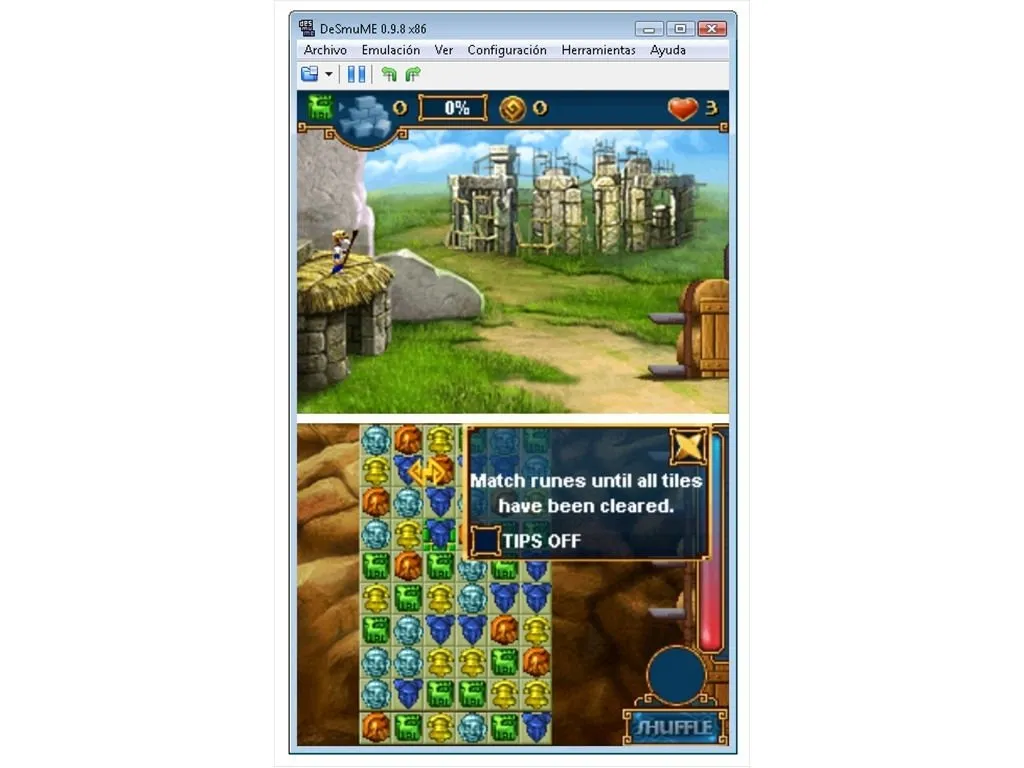
DeSmuME represents the pinnacle of Nintendo DS emulation technology, offering a sophisticated software solution that faithfully recreates the dual-screen gaming experience on modern computing devices. As the most seasoned and widely recognized open-source NDS emulator, DeSmuME has evolved significantly since its inception, becoming the benchmark by which all other DS emulation software is measured . At its core, DeSmuME replicates the complex architecture of the Nintendo DS hardware, which features two ARM processors running at different speeds. This technical achievement allows users to enjoy their favorite DS titles without requiring the original handheld console, preserving gaming history while providing enhanced functionality unavailable on the actual device. The emulator's development philosophy prioritizes both accuracy and performance, resulting in a balanced approach that delivers authentic gameplay while minimizing system resource usage. Recent versions have introduced substantial optimizations, including 3D upscaling capabilities that allow users to enhance game graphics beyond their original resolution . This feature, available in newer versions of DeSmuME, enables players to experience their favorite DS games with improved visual fidelity on modern high-resolution displays. One of DeSmuME's most compelling strengths lies in its exceptional game compatibility. The emulator supports an extensive library of NDS titles, with compatibility continually improving through regular updates and refinements . This commitment to accuracy ensures that whether you're playing classic RPGs, action games, or puzzle titles, the experience remains faithful to the original hardware. The dual-screen implementation deserves special mention, as DeSmuME offers multiple layout options to accommodate different monitor configurations and player preferences. Users can choose between horizontal, vertical, or custom screen arrangements, with the flexibility to maximize either screen or hide the secondary display entirely . This thoughtful design addresses the inherent challenge of adapting a dual-screen handheld experience to a single computer monitor. Performance considerations have been central to DeSmuME's development, with each version reducing CPU and GPU usage while maintaining emulation accuracy. The emulator includes various magnification filters such as HQ2x, 2Xsal, and SuperEagle, which enhance pixel art graphics to create smoother visuals that respect the original artistic intent . These filters are particularly valuable for preserving the aesthetic quality of older games on modern displays. DeSmuME's accessibility extends to its straightforward installation process. As a standalone application, it requires no complex installation wizard—users simply extract the program from its compressed archive and execute it directly . This portability allows for easy management from any folder or external drive, making it convenient for gamers who maintain organized emulation setups. The emulator also includes comprehensive controller support, allowing users to configure keyboard inputs or connect gamepads for a more authentic experience. The control configuration system enables precise mapping of all DS buttons and functions, with support for both standard game controllers and specialized input devices . While primarily designed for Windows systems, DeSmuME maintains cross-platform availability with versions for macOS and Linux, ensuring that DS emulation isn't limited to a single operating system . This broad compatibility demonstrates the project's commitment to reaching the widest possible audience of retro gaming enthusiasts. For enthusiasts seeking to explore the Nintendo DS library on modern hardware, DeSmuME offers an unmatched combination of accuracy, performance, and features. Its balance of technical sophistication and user-friendly design makes it suitable for casual gamers and serious preservationists alike, cementing its status as an essential tool in the retro gaming ecosystem.

Features

Authentic DS Emulation - Faithfully recreates Nintendo DS hardware on PC
Dual Screen Display - Multiple layout options for two-screen configuration
3D Graphics Upscaling - Enhances 3D game graphics beyond native resolution
Graphics Enhancement - Multiple magnification filters for improved visuals
Controller Support - Full gamepad and keyboard configuration
Compressed ROM Support - Runs directly from ZIP, 7Z, RAR files
High Compatibility - Supports extensive NDS game library
Portable Installation - No installer required, runs from extracted folder
Sound Emulation - Accurate audio reproduction
Save States - Save and load game progress anytime
Performance Optimization - Efficient resource usage

System Requirements

Minimum Requirements

CPU

2.0 GHz Intel Core 2 Duo or equivalent

Memory (RAM)

2 GB

Storage

100 MB available space

Write a Review

Reviews are moderated. Your review will be published after being approved by an administrator.

Have an account? Log in to post a review, or continue below with your name and email.

Share what you like or dislike about this emulator. Maximum 1000 characters.

Your email won't be published publicly.

Ratings & Reviews

No reviews yet

Be the first to review DeSmuME.

DeSmuME

Download DeSmuME

Get the latest version of DeSmuME and start using it right away.

Latest Version
0.9.13
Added
May 23, 2022
Download Now
5.8 MB
Free
Safe & Virus-Checked

Related Software

Dolphin logo

Dolphin

Dolphin is a free, open-source emulator that lets users play GameCube and Wii games on modern platforms like Windows, Linux, macOS, and Android. It enhances gaming with high-definition graphics, customizable controls, turbo speed, and online multiplayer, making it a top choice for retro gaming enthusiasts.
PCSX2 logo

PCSX2

PCSX2 is a free, open-source PlayStation 2 emulator for Windows, Linux, and macOS. It allows users to play PS2 games on PCs with enhanced graphics, save states, and customizable controls. Leveraging plugins and BIOS files, PCSX2 replicates the console’s hardware, offering improved resolution and performance. Popular among retro gamers, it preserves classic titles while modernizing the experience.

RPCS3 logo

RPCS3

RPCS3 is a free, open-source PlayStation 3 emulator enabling PC gamers to play PS3 titles on Windows, Linux, or macOS. It leverages advanced techniques like dynamic recompilation and Vulkan rendering to replicate the PS3’s complex Cell architecture. With growing compatibility, save states, and controller support, RPCS3 revitalizes classic games like Demon’s Souls and Persona 5 for modern hardware.

PPSSPP logo

PPSSPP

PPSSPP is a free, open-source PSP emulator enabling high-definition gameplay of PlayStation Portable games on PC, mobile, and consoles. It enhances graphics, supports save states, and offers cross-platform compatibility. Ideal for retro gaming enthusiasts, it revitalizes classic titles with modern features like controller support and multiplayer modes.

Yuzu logo

Yuzu

Yuzu is a free, open-source Nintendo Switch emulator for Windows, Linux, and Android. It enables users to play Switch games on non-Nintendo hardware with high compatibility and performance. Developed in C++, Yuzu supports resolution scaling, save states, and controller customization. Regular updates enhance game support and optimization, making it a leading choice for Switch emulation. Keywords: Nintendo Switch emulator, open-source, Yuzu, gaming, compatibility.